

In 2024, Canadian small businesses spent an average of 735 hours on regulation, including 256 hours of avoidable red tape, according to the CFIB. That is government paperwork only: your invoices and emails come on top.
Three yes answers out of three: that task goes first
Before spending a dollar, run each task through three questions.
- Does it come back at least once a week? A task you do twice a year is rarely worth the setup.
- Are the steps always the same? If they fit on a sticky note, software can follow them.
- Is a mistake costly? A forgotten reminder means a late payment.
Example
There are three of you in the office. Each new client is copied from the web form into your CRM (your client file software), then into accounting.
Ten times a week, same steps, and one typo sends an invoice to the wrong address. Three yes answers.
Seven admin tasks a small business can take off its week
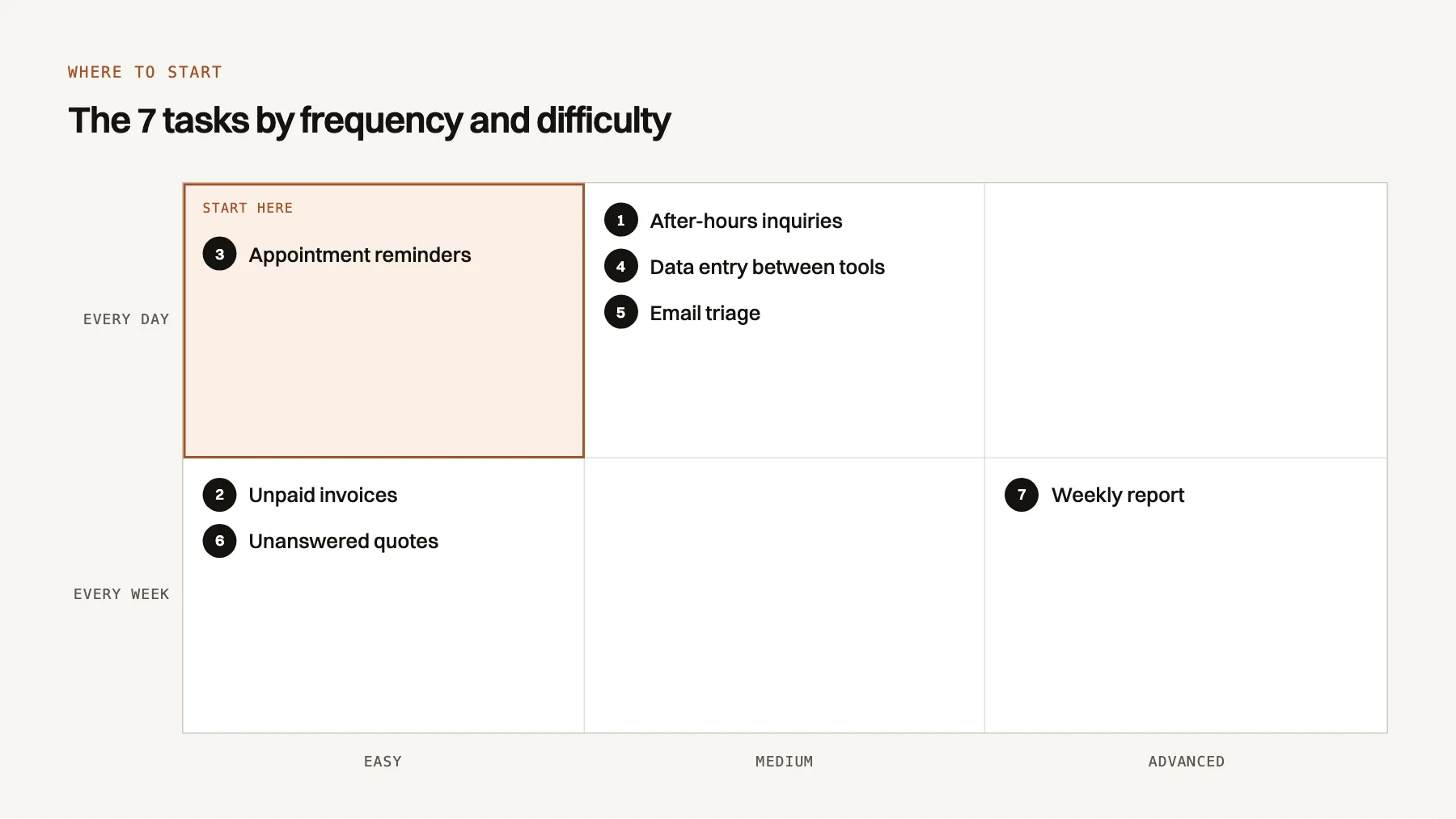
1. Friday night inquiries get an answer within minutes
MediumA client fills in your form at 9 p.m. on a Friday. You see it Monday, after they have called a competitor.
After: an AI agent answers and books a call in your calendar. It is software that reads a message and takes a simple action you approved. See what AI agents for small businesses can and cannot do.
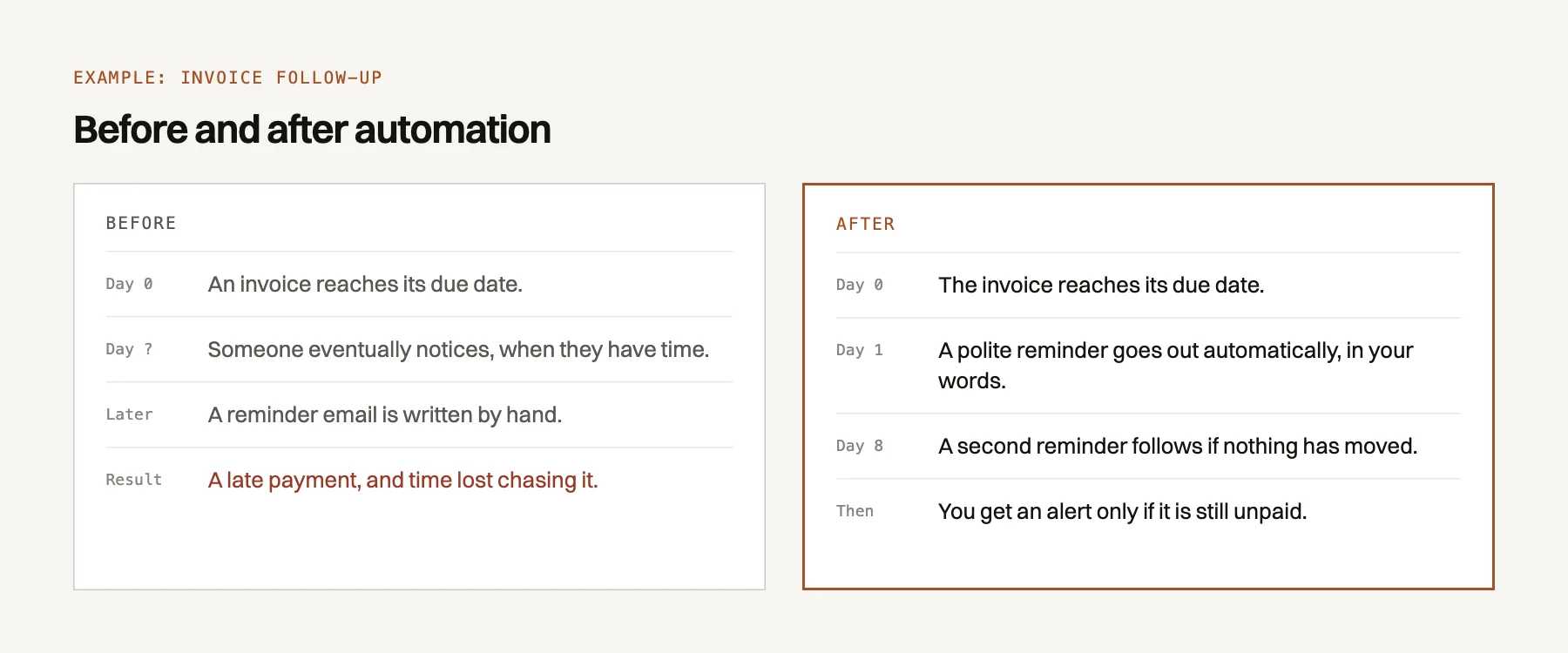
2. Unpaid invoices get followed up on their own
EasyYou do your invoicing on Sunday night, and chasing payments waits until next week. Then the invoice is 60 days late.
After: the day after the due date, a polite reminder goes out in your words. A second follows a week later, then you get an alert. A classic AI automation project.
3. Appointments get confirmed and reminded without a phone call
EasyA missed appointment is a lost slot, and calling every client the day before takes time you do not have.
After: a confirmation goes out at booking, a reminder by email or text the day before.
4. A new client is entered once, not four times
MediumThe same name and phone number get typed into the form, the CRM and the accounting software. Every copy risks a typo.
After: the information is entered once and sent to every tool that needs it.
5. Emails and attachments are sorted before you open your inbox
MediumClient questions, supplier invoices and newsletters share one inbox. The first hour of the day goes to sorting.
After: AI labels each email, files attachments and flags urgent questions. See how accounting firms use AI in tax season.
6. Quotes with no answer get a follow-up on time
EasyThe client says "I'll think about it", then nothing. You meant to follow up, but the next job was waiting.
After: every quote is tracked in your CRM. After five silent days, a short message goes out; after ten, you get a reminder to call.
7. Monday's report lands in your inbox, already written
AdvancedYour numbers sit in four different tools, so the weekly report never gets done.
After: every Monday at 8 a.m., you get a summary of inquiries, quotes and payments. Pulling from several tools often calls for custom AI tools.
Cloud software connects easily, installed software takes more work
Zapier and n8n are automation platforms that link apps without code. They use connectors, ready-made modules such as QuickBooks Online on Zapier. An API is the door a program opens to other tools.
| Tool | Used for | How it connects |
|---|---|---|
| Gmail, Outlook | Ready-made connectors | |
| Google Calendar, Outlook calendar | Appointments | Ready-made connectors |
| Google Sheets | Tables, reports | Ready-made connectors |
| QuickBooks Online | Accounting | Ready-made connectors (Zapier, n8n) |
| Sage Accounting (cloud) | Accounting | Ready-made connector on Zapier |
| Sage 50, Acomba (installed on a computer) | Accounting | No official connector found; file imports or the publisher's developer program (Acomba) |
| CRM such as GoHighLevel or HubSpot | Inquiries, follow-ups | Through their API |
During the free AI diagnostic, we check each of your tools before quoting a price.
Start with one task, measured before and after
- Pick one taskTake the one with the most yes answers to the three questions.
- Measure it for a weekNote each time you do it and how many minutes it takes.
- Automate itAt first, you approve the results until you trust them.
- Measure againCompare before and after, then decide on the next task.
How many hours does this task take you each year?
Nothing is sent: the calculation stays in your browser.
Formula: hours per week × value of your hour × weeks worked.
Divide by 12 and compare it to the automation's monthly subscription.
Thinking of an agent that answers clients? Here is what an AI agent costs a small business.
Judgment, complaints and unusual cases stay with you
Automation repeats steps well but cannot weigh a new situation. Keep a person on:
- Decisions: hiring, pricing exceptions, credit, suppliers.
- Delicate situations: a complaint or bad news. The client wants a human.
- Unusual cases: anything outside the normal steps.
A reminder can go out alone; a reminder to a client disputing an invoice should not.
Frequently asked questions
Do I need to change my software to automate?
Rarely. Most automations connect the tools you already use. If an old program refuses any connection, we find a workaround or tell you plainly if switching saves more time.
How long does it take to set up an automation?
Between 1 and 4 weeks for a first simple automation. An appointment reminder sits at the short end; a report pulling from four tools takes longer.
Will my employees lose their jobs?
No. Automation removes the copying, sorting and reminding, not the people. In a small team, that time goes back to clients and to the tasks that were always pushed to later.
What if the automation makes a mistake?
It can happen, which is why you approve the results at first. After that, you get an alert when something fails, and a log records every action. Sensitive steps always keep a human check.
Is it worth it if I work alone or almost alone?
Yes, often more than in a large company. When you do the admin at night, every hour you get back is yours. One well-chosen task is enough to start.